
Living Museum of Learning
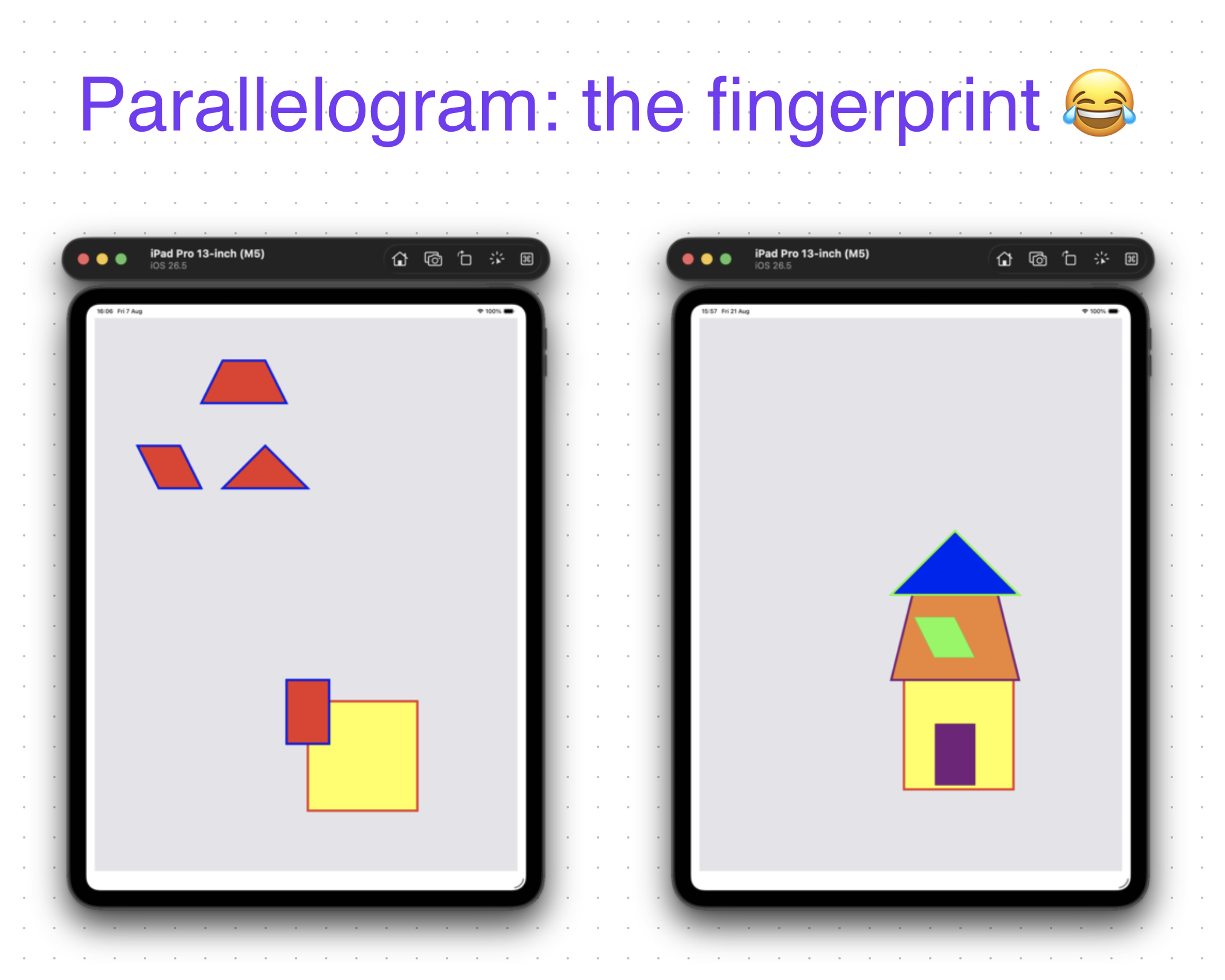
The Parallelogram Fingerprint
Two weeks ago, Tianjing had never written a line of code.
She was beginning her first iOS project in Xcode—a professional development environment filled with millions of unfamiliar things:
class, func, { }, UIBezierPath, let, CGPoint, CGFloat, UIColor...
Even creating another UIBezierPath object was a risky adventure for a beginner who had only recently started learning programming.
A few days ago, Tianjing had barely written a square root symbol comfortably.
Yet in her first iOS project, she drew several geometric shapes separately on the iPad simulator.
They became almost her signature.
Two or three days ago, she reused those shapes to create a cute color house for homework.
But strangely, she didn't post the homework in Slack or the family group as she and her sister normally did.
Today, while working on a new Gomoku iOS project, she needed to draw lines. I showed her how to reopen her old Xcode projects.
She found one and casually asked:
“How can I launch it?”
💥
“What?! We never saw this!”
She replied gently:
“Ah, this is my homework. I forgot to send.”
The color house immediately reminded me of shapes I had seen somewhere before.
Time for Detective Donald. 😂
I scrolled back through Slack and found screenshots from her first iOS project.
Then I put the two screenshots side by side.
BOOM.
There they were.
The old geometric shapes had been reused in the new house:
relocated;
resized a little;
recolored;
and given completely new roles.
But then Detective Donald found the fingerprint.
The parallelogram.
Who uses a parallelogram as a window?
In Tianjing's first project, there was a small red parallelogram sitting on the left side of the screen.
In her color house, there was a green parallelogram of exactly the same size sitting on the roof.
A high window.
😂
The same little shape.
New location.
New color.
New purpose.
Suddenly, the color house looked like an accidental constraint competition:
Can you make a house using all the shapes you already have?
Tianjing didn't need to create five new geometric objects inside the terrifying world of Xcode.
She already had a working vocabulary.
She reused it.
The square became part of the house.
The trapezoid became the roof.
The parallelogram became a high window.
The triangle found another role.
The rectangle became another architectural piece.
She changed positions, sizes and colors, and suddenly a collection of old exercises became a new picture.
What looked like a simple shortcut was actually a very sensible beginner strategy.
Don't enter unknown territory if you already have something that works.
For an experienced programmer, writing:
let pencil6 = UIBezierPath()
is almost nothing.
For Tianjing, every word is still unfamiliar.
let.
UIBezierPath.
Parentheses.
Objects.
Coordinates.
Methods.
Xcode itself is overwhelming.
So reusing an existing working object is not merely laziness.
It is risk management.
And perhaps something even more interesting happened:
Tianjing had forgotten that she had made the color house.
She had forgotten to send it.
She may not have consciously remembered the old parallelogram.
But her work remembered.
The same shape survived from one project to another.
This is why we shouldn't ask only:
“What does the learner remember?”
We should also ask:
“What can the learner still do?”
Sometimes learning leaves fingerprints long after conscious memory has faded.
And sometimes Detective Donald just has to scroll up in Slack to find them. 😂