
Living Museum of Learning
The Day a Tiny VM Taught Us About Memory
For weeks, our Living Museum of Learning ran quietly on a small Google Cloud VM. The website was healthy, visitors were arriving, and everything appeared normal.
Then one morning, SSH from the Mac suddenly became painfully slow. The browser console failed. The serial console looked like a wall of mysterious Linux messages. It felt like Google Cloud had broken our connection.
But the VM was alive.
Instead of blaming SSH, we entered through the serial console and looked deeper.
The clues were everywhere:
SSH sessions moved painfully slowly.
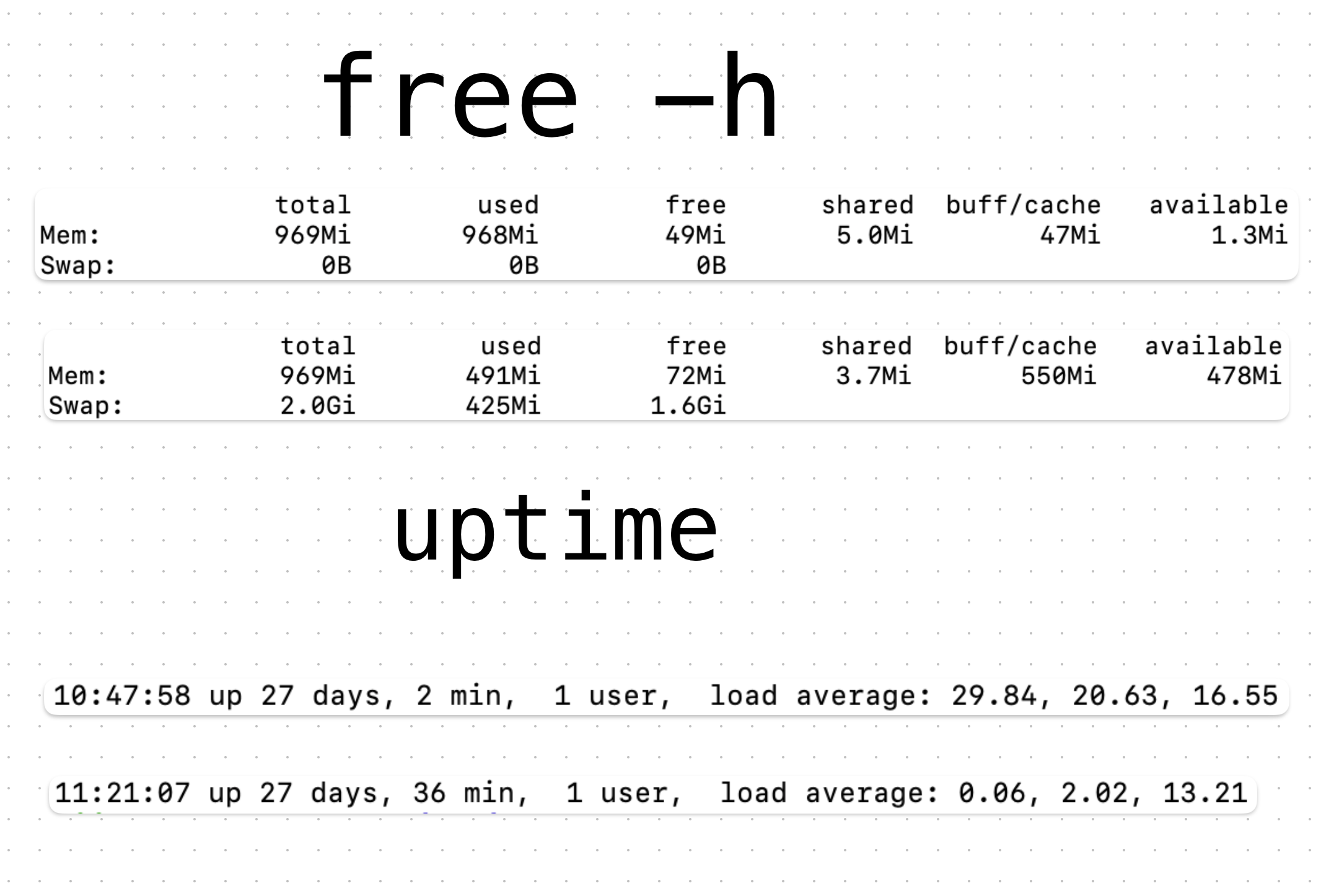
Local requests that normally took milliseconds took more than 12 seconds.
System load climbed above 30.
The kernel process kswapd0 was consuming almost all CPU.
Then we found the real problem:
The VM had only 1 GB of memory.
And it had:
Swap: 0B
No safety cushion.
We added a 2 GB swap file.
Within minutes, the frozen machine came back to life:
SSH became responsive again.
The museum API returned in 0.1 seconds instead of 12 seconds.
CPU load dropped from 37 to almost zero.
Nothing was wrong with our application.
The problem was the invisible world underneath it: the operating system, memory pressure, and resource management.
A tiny cloud server had taught us a big systems lesson.
A computer is not just code running on hardware. It is an ecosystem.
Applications, databases, monitoring agents, operating systems, and cloud services all compete for limited resources.
When something breaks, the visible symptom may not be the real cause.
A slow SSH connection may not be an SSH problem.
A failed web request may not be a web problem.
A cloud outage may not be a cloud problem.
Good engineers learn to follow the evidence.